
In this article, I will show you how to train a model that helps us predict car prices with machine learning using PyTorch. The dataset I will use here for car price prediction is tabular data with the prices of different cars in relation to other variables; the dataset contains 258 rows and 9 columns, and the variable we want to predict is the selling price of the cars.
What is PyTorch?
PyTorch is a Python library that provides tools for building deep learning models. What Python does for programming, PyTorch does for deep learning. Python is a very flexible programming language and, like Python, the PyTorch library provides flexible tools for deep learning. If you are learning deep learning or looking to get started with it, knowing PyTorch will help you a lot in building your own deep learning models.
Predicting car prices with PyTorch
Now let's start the machine learning task of predicting car prices with PyTorch. I will start by importing all the necessary libraries we need for this task. The dataset I am using for this task can be downloaded easily from here:
import torch
import jovian
import torch.nn as nn
import pandas as pd
import matplotlib.pyplot as plt
import torch.nn.functional as F
from torch.utils.data import DataLoader, TensorDataset, random_split
Now let's read the data:
DATA_FILENAME = "car_data.csv"
dataframe_raw = pd.read_csv (DATA_FILENAME)
dataframe_raw.head ()
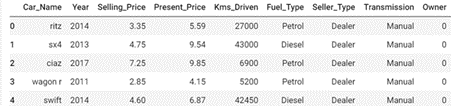
You can see the shape of the data, but before using it we need to customize it, shuffle the rows and remove the columns that do not help the prediction; here we drop the car names, and to do this customization we use the following function:
your_name = "Aman Kharwal" # at least 5 characters
def customize_dataset(dataframe_raw, rand_str):
    dataframe = dataframe_raw.copy(deep=True)
    # drop some rows
    dataframe = dataframe.sample(int(0.95*len(dataframe)), random_state=int(ord(rand_str[0])))
    # scale input
    dataframe.Year = dataframe.Year * ord(rand_str[1])/100.
    # scale target
    dataframe.Selling_Price = dataframe.Selling_Price * ord(rand_str[2])/100.
    # drop column
    if ord(rand_str[3]) % 2 == 1:
        dataframe = dataframe.drop(['Car_Name'], axis=1)
    return dataframe


dataframe = customize_dataset(dataframe_raw, your_name)
dataframe.head()
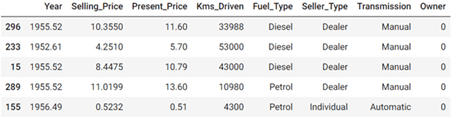
In the function above, as we can see, it needs a word to use as a random string to shuffle the data randomly; I used my name as the random string. After that we can use the customized dataset. For simplicity, we can create variables that hold the number of rows and columns, and variables that hold the numeric, categorical or output columns:
input_cols = ["Year","Present_Price","Kms_Driven","Owner"]
categorical_cols = ["Fuel_Type","Seller_Type","Transmission"]
output_cols = ["Selling_Price"]
Preparing the data
As mentioned at the beginning of the article, I will use PyTorch to predict car prices with machine learning, so to use the data for training we need to convert it from the data frame into PyTorch Tensors. The first step is converting to NumPy arrays:
def dataframe_to_arrays(dataframe):
    # Make a copy of the original dataframe
    dataframe1 = dataframe.copy(deep=True)
    # Convert non-numeric categorical columns to numbers
    for col in categorical_cols:
        dataframe1[col] = dataframe1[col].astype('category').cat.codes
    # Extract input & outupts as numpy arrays
    inputs_array = dataframe1[input_cols].to_numpy()
    targets_array = dataframe1[output_cols].to_numpy()
    return inputs_array, targets_array


inputs_array, targets_array = dataframe_to_arrays(dataframe)
inputs_array, targets_array
The function above converts the input and output columns into NumPy arrays; to check, you can display the result and see how the data is converted into arrays. Now, with these arrays, we can convert them into PyTorch tensors and use those tensors to create a dataset variable that contains them:
inputs = torch.Tensor(inputs_array)
targets = torch.Tensor(targets_array)


dataset = TensorDataset(inputs, targets)
train_ds, val_ds = random_split(dataset, [228, 57])
batch_size = 128


train_loader = DataLoader(train_ds, batch_size, shuffle=True)
val_loader = DataLoader(val_ds, batch_size)
Creating a PyTorch model
Now I will create a linear regression model with PyTorch to predict car prices:
input_size = len(input_cols)
output_size = len(output_cols)


class CarsModel(nn.Module):
    def __init__(self):
        super().__init__()
        self.linear = nn.Linear(input_size, output_size)                  # fill this (hint: use input_size & output_size defined above)

    def forward(self, xb):
        out = self.linear(xb)                          # fill this
        return out

    def training_step(self, batch):
        inputs, targets = batch
        # Generate predictions
        out = self(inputs)
        # Calcuate loss
        loss = F.l1_loss(out, targets)                 # fill this
        return loss

    def validation_step(self, batch):
        inputs, targets = batch
        # Generate predictions
        out = self(inputs)
        # Calculate loss
        loss = F.l1_loss(out, targets)                   # fill this
        return {'val_loss': loss.detach()}

    def validation_epoch_end(self, outputs):
        batch_losses = [x['val_loss'] for x in outputs]
        epoch_loss = torch.stack(batch_losses).mean()   # Combine losses
        return {'val_loss': epoch_loss.item()}

    def epoch_end(self, epoch, result, num_epochs):
        # Print result every 20th epoch
        if (epoch+1) % 20 == 0 or epoch == num_epochs-1:
            print("Epoch [{}], val_loss: {:.4f}".format(epoch+1, result['val_loss']))

model = CarsModel()


list(model.parameters())
In the function above, I used the nn.Linear function, which lets us use linear regression, so that we can now compute the predictions and the loss with the F.l1_loss function. The F.l1_loss function can see a bias for one weight parameter. With this model we will get predictions, but we still have to go through training.
Training the model to predict car prices
We now need to evaluate the loss and see how large it is, and after training, see how much the loss decreases with training:
# Eval algorithm
def evaluate(model, val_loader):
    outputs = [model.validation_step(batch) for batch in val_loader]
    return model.validation_epoch_end(outputs)


# Fitting algorithm
def fit(epochs, lr, model, train_loader, val_loader, opt_func=torch.optim.SGD):
    history = []
    optimizer = opt_func(model.parameters(), lr)
    for epoch in range(epochs):
        # Training Phase
        for batch in train_loader:
            loss = model.training_step(batch)
            loss.backward()
            optimizer.step()
            optimizer.zero_grad()
        # Validation phase
        result = evaluate(model, val_loader)
        model.epoch_end(epoch, result, epochs)
        history.append(result)
    return history


# Check the initial value that val_loss have
result = evaluate(model, val_loader)
print(result)
{'val_loss': 2300.039306640625}
# Start with the Fitting
epochs = 90
lr = 1e-8
history1 = fit(epochs, lr, model, train_loader, val_loader)
Epoch [20], val_loss: 1692.0131
Epoch [40], val_loss: 1119.7253
Epoch [60], val_loss: 638.9708
Epoch [80], val_loss: 357.3529
Epoch [90], val_loss: 317.1693
# Train repeatdly until have a 'good' val_loss
epochs = 20
lr = 1e-9
history1 = fit(epochs, lr, model, train_loader, val_loader)
Epoch [20], val_loss: 7.9774
As you can see, the fitted model's functions are used for evaluation, and for training we use optimization functions, specifically the SGD optimizer in this case. With the training loader, the loss and gradients are computed, then optimized, and the result of each iteration is evaluated to see the loss.
Using the model to predict car prices
Finally, we need to test the model with specific data. To predict, we need to use inputs, which will be the input values we see in the dataset, and the model is the Cars model we built; to pass them through the model, flattening is necessary. So with all this, we predict the selling prices:
# Prediction Algorithm
def predict_single(input, target, model):
    inputs = input.unsqueeze(0)
    predictions = model(inputs)                # fill this
    prediction = predictions[0].detach()
    print("Input:", input)
    print("Target:", target)
    print("Prediction:", prediction)


# Testing the model with some samples
input, target = val_ds[0]
predict_single(input, target, model)
Input: tensor([1.9565e+03, 1.7800e+00, 4.0000e+03, 0.0000e+00])
Target: tensor([1.7985])
Prediction: tensor([1.4945])
As you can see, the predictions are very close to the expected target; they are not exact, but they are similar to what is expected. With this you can now test different results and see how good the model is:
input, target = val_ds[10]
predict_single(input, target, model)
Input: tensor([1.9555e+03, 8.4000e+00, 1.2000e+04, 0.0000e+00])
Target: tensor([6.9760])
Prediction: tensor([-0.4069])
I hope you liked this article on how to predict car prices with deep learning using a linear regression model trained with PyTorch.
Post links
- Original link: youtube.com
- Source: Deep Learning Projects with Python



Hi, this is a comment.
To get started with moderating, editing, and deleting comments, please visit the Comments screen in the dashboard.